Building an Isometric Action RPG in the Browser with Three.js
Ash & Oath is a dark fantasy action RPG: four classes, four story chapters, gear crafting and progression to level 100, all running in a browser tab. It's built with plain JavaScript, Three.js and Vite, with no game engine.
This post covers the rendering decisions that made it work, and the problems I didn't see coming, most of which turned out to be about memory, not speed.
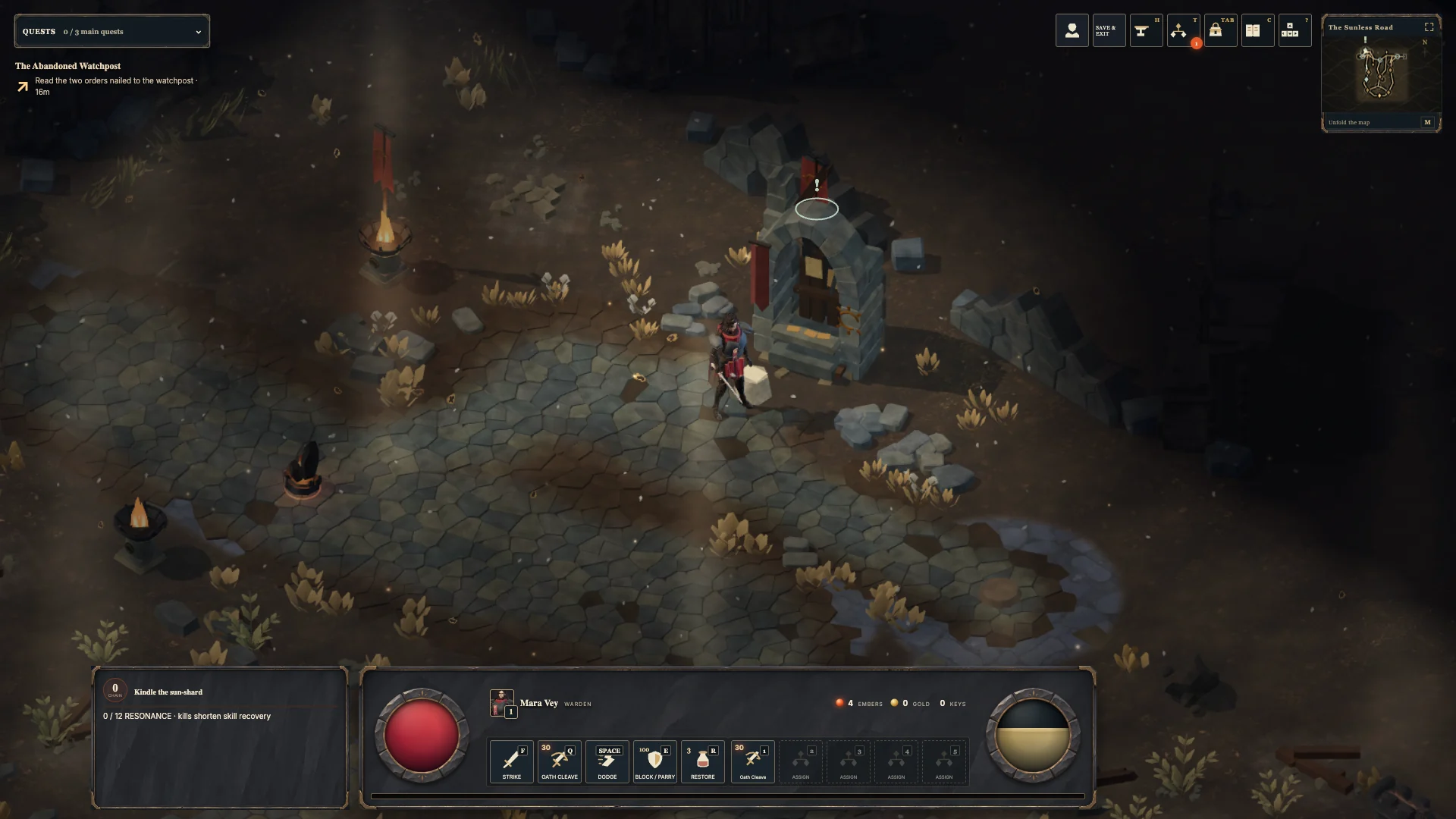
The camera: orthographic, from a fixed angle
The classic isometric look comes from an orthographic camera: objects don't get smaller with distance, so the world reads like a diorama and every tile is the same size wherever it is on screen.
camera = new THREE.OrthographicCamera(-1, 1, 1, -1, 1, 4200);
const CAMERA_OFFSET = new THREE.Vector3(760, 900, 760);

// Every frame: follow the hero from the same angle
camera.position.copy(target).add(CAMERA_OFFSET);
camera.lookAt(target);
Equal X and Z offsets put the camera on the diagonal, which is what gives the world its isometric angle. Zoom is the camera's own zoom property, clamped between 0.75 and 1.75, so it never changes the angle.
A fixed angle has a big side benefit: everything about the view is predictable. Clicks become ground positions with one raycast against a flat plane, and later optimisations rely on that predictability too.
Shadows that fit the screen
A directional light (the sun) casts shadows inside a box. Make it too small and shadows get cut off. Make it too big and each shadow pixel covers more ground, so shadows go blurry.
I first used a fixed box that fitted the default zoom. Then players zoomed out or used wide windows, and building shadows near the screen edge got sliced along a line that swept across the floor as you walked.
Because the camera is orthographic and its angle never changes, you can calculate exactly how much ground is visible. So the shadow box is sized to the view: project the four screen corners onto the ground, measure how far they reach along the sun's axes, and grow the box (in steps, never below the original size) only when the view needs it. As the box grows, the shadow bias scales with it, which stops the floor from showing speckled "shadow acne".
Three graphics presets
Players pick Low, Balanced or High:
export const GRAPHICS_PRESETS = Object.freeze({
  low:      { pixels: 1_200_000, dpr: 1.25, shadow: 1024, weather: false, glow: false },
  balanced: { pixels: 2_500_000, dpr: 2,    shadow: 2048, weather: true,  glow: false },
  high:     { pixels: 3_600_000, dpr: 2,    shadow: 2048, weather: true,  glow: true },
});
The interesting field is pixels. Instead of only capping the device pixel ratio, each preset caps the total number of pixels drawn:
Math.min(devicePixelRatio, preset.dpr, Math.sqrt(preset.pixels / (width * height)));
A 4K monitor at device pixel ratio 2 would otherwise mean rendering more than 30 million pixels a frame. With the cap, a large window is drawn at a lower internal resolution and scaled up, so frame cost stays roughly the same whatever screen you have.
Phones and tablets start on Low. A player's saved choice always wins.
Adaptive resolution
On top of the preset, the game watches its own frame times and adjusts:
- If too many frames in a 1.5-second window miss 60 fps, the render scale steps down.
- If stepping all the way down doesn't clearly help, the scene is limited by geometry, not pixels. The scale then goes back to where it started and stays there until the next chapter or dungeon, rather than blurring the screen for nothing.
- When there's sustained headroom, it steps back up. If a step up fails immediately, the wait before the next attempt doubles, so the resolution doesn't flicker up and down.
- Frames longer than 250 ms (loading, a hidden tab, shader compilation) are ignored, so a single hitch doesn't drop the quality.
The real enemy: memory on phones
Performance tuning got the frame rate where I wanted it. Then the game started crashing on iPhones, without even an error. iOS counts WebGL memory against the tab, and when the tab runs out it simply reloads the page. After a few tries it gives up with "A problem repeatedly occurred".
The culprit was textures. A 4096 × 4096 texture with mipmaps uses roughly 90 MB of GPU memory, whatever the file size on disk. Three fixes solved it:
1. Cap texture sizes on touch devices before they're uploaded to the GPU: 1024px on tablets and 512px on phones. Oversized images are drawn into a smaller canvas once, and the full-size bitmap is released:
const scale = limit / Math.max(width, height);
canvas.width = Math.round(width * scale);
canvas.height = Math.round(height * scale);
canvas.getContext('2d', { willReadFrequently: true }).drawImage(image, 0, 0, canvas.width, canvas.height);
image.close?.();
source.data = canvas;
willReadFrequently keeps that canvas on the CPU. An accelerated canvas would put a second copy of every texture on the GPU, the opposite of the point.
2. Let go of the downloaded model file. Three.js's glTF loader keeps the parsed file, including all its embedded images, long after the textures are built. Nothing reads it again, so on touch devices the loader drops that reference once the model is ready.
3. Remember crashes. Each launch leaves a marker in local storage that's cleared once the game has run stably for 30 seconds, or when the page closes normally. If the next visit finds the marker still there, the previous launch was killed, so the game switches that device to light mode (smaller textures still) instead of crashing again. Saves are never touched.
Shipping the models
Character and prop models go through a glTF Transform pipeline that compresses the geometry with meshopt. The meshopt decoder is bundled with the game, so loading never depends on a third-party CDN. Model filenames include a content hash, so browsers can cache them forever. The desktop app also uses those hashes to load models from the install instead of downloading them again (more on that in shipping a web game as a PWA and desktop app).
Testing a game made of scripts
There's no editor, so the game is checked by scripts, 87 of them at the moment: verify:performance, verify:model-loading, verify:grounding (do characters' feet stay planted while they walk, run and fight?), verify:motion and more. Most load the game's own modules in Node and check the results directly, without a browser. That isn't as convenient as an engine's editor, but it means every change can be checked automatically.
Would I use Three.js again?
For this game, yes. The goal from the start was a game that runs well in a browser, and that's why I chose Three.js.
What I'd tell anyone attempting the same:
- An orthographic camera at a fixed angle makes many hard problems easy, from picking to shadows.
- Budget pixels, not pixel ratios.
- Test on a real phone early. Memory, not frame rate, is what kills browser games on mobile.
- Plan for the crash. Detect a killed launch and fall back, instead of crashing in a loop.
You can play Ash & Oath in your browser at ashoath.vercel.app, or download it for macOS or Windows.