How ReadSprint Turns a Photo of a Book Cover into Chapter Summaries
I read a lot of non-fiction and used to forget most of it within a month. ReadSprint is the tool I built to fix that: photograph a book cover, or type a title and author, and you get a summary for every section of the book, followed by a five-question quiz that makes you recall it.
From the outside it looks like one request to an AI model. It isn't. A single "summarise this whole book" prompt falls apart quickly: responses get cut off, chapters go missing, and the structure changes from one book to the next. This post walks through the pipeline that replaced it.
Step 1: Work out which book it is
Everything starts with an outline. The model gets either the cover photo or the title and author, and has to return four fields:
const TOCSchema = z.object({
  title: z.string(),
  author: z.string(),
  totalChapters: z.number(),
  chapterTitles: z.array(z.string()),
});
The prompt is strict about one thing in particular: if it can't identify the book confidently, it must say so. It returns zero sections, and ReadSprint shows a "we couldn't identify this book" message instead of inventing a plausible-sounding book that doesn't exist. Getting a confident wrong answer is much worse than getting no answer.
There's a second honest choice here. ReadSprint doesn't have the full text of the book, so it doesn't pretend to reproduce the real table of contents. The prompt asks for a thematic study outline: section headings that cover the book's ideas. That's what the summaries are built on.
Step 2: Generate the sections in batches
With an outline in hand, the sections are written eight at a time:
const batchSize = 8;
const allChapters: Array<{ title: string; content: string } | null> = Array(total).fill(null);

for (let i = 0; i < total; i += batchSize) {
  const titlesForRange = titles.slice(i, Math.min(i + batchSize, total));
  // ...ask for exactly these sections, in this order
}
Smaller batches keep every response well inside the output limit, and the fixed-size array means each section lands at its own position. If a batch comes back with six sections instead of eight, the gaps are obvious.
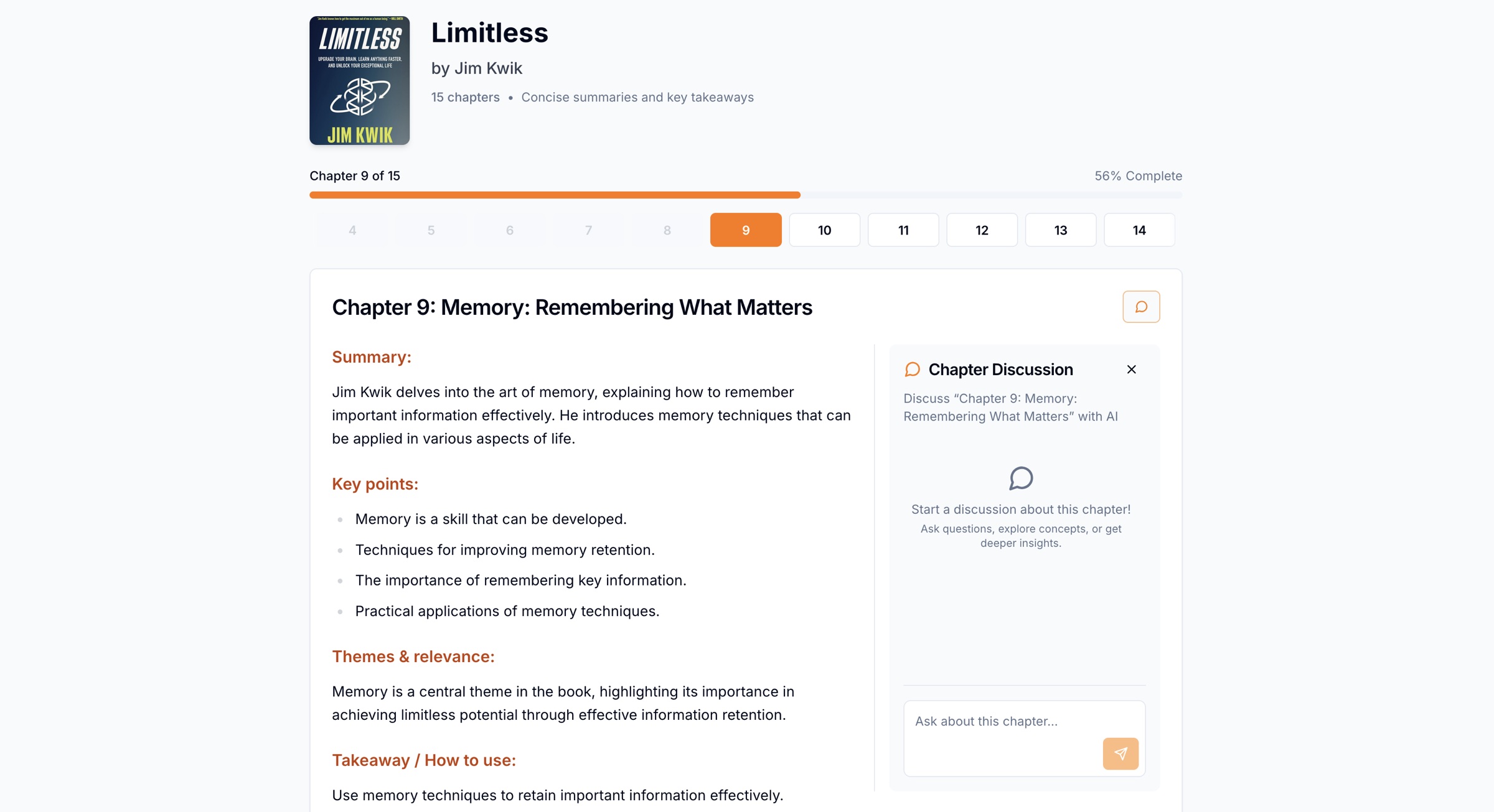
Every section uses the same Markdown structure, which the prompt spells out exactly:
#### Summary:
(2-3 sentences)
#### Key points:
- (3-6 bullets)
#### Themes & relevance:
(1-2 sentences)
#### Takeaway / How to use:
(1 short actionable sentence)
A fixed structure is what makes the summaries feel like a product rather than chat output. Every book reads the same way, and the interface can rely on the headings being there.
The prompt also tells the model not to invent quotations, studies or page references, and to mark anything uncertain with "(inferred)". Book summaries are exactly where a model will happily make up a convincing quote, so this rule matters.
Step 3: Fill in anything that went missing
After the batches finish, ReadSprint looks for empty slots and regenerates each one individually with a focused prompt. If even that fails, the section keeps its title with empty content, so the order of the book is never scrambled.
Step 4: Validate everything, and fall back when it fails
Every model call goes through one helper, generateWithSchema. It uses the Vercel AI SDK's generateObject with a Zod schema, then validates the result again before trusting it:
for (const modelName of models) {            // e.g. ["gpt-5-mini", "gpt-4o-mini"]
  for (const temperature of [0, 0.15]) {
    for (let attempt = 1; attempt <= maxAttempts; attempt++) {
      const { object } = await generateObject({ model: openai(modelName), temperature, messages, schema });
      const parsed = schema.safeParse(object);
      if (parsed.success) return parsed.data;
      await new Promise((r) => setTimeout(r, 250 * attempt));
    }
  }
}
throw lastError;
So a request tries the primary model at temperature 0, retries with backoff, nudges the temperature slightly, and only then falls back to a second model. Most requests succeed on the first try. The loop exists for the ones that don't, so users never see a half-built summary.
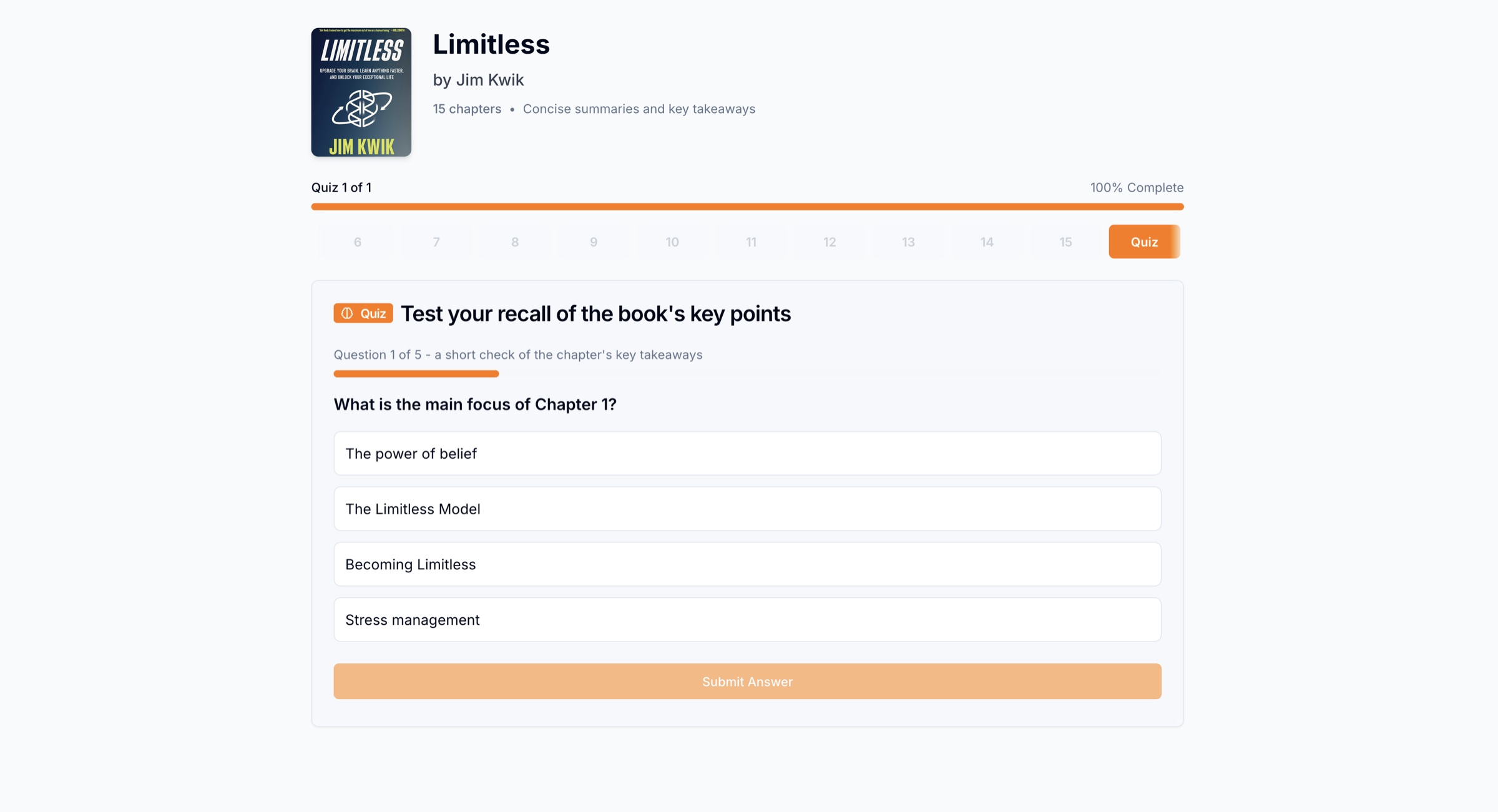
Step 5: Write the quiz from the summaries
The quiz comes last, and it's generated from the sections ReadSprint just wrote, not from the model's memory of the book. To keep the prompt small, it gets each section's title and its first 240 characters. The schema demands exactly five questions with exactly four options each:
const QuizSchema = z
  .array(
    z.object({
      question: z.string(),
      options: z.array(z.string()).length(4),
      correctAnswer: z.number().min(0).max(3),
    }),
  )
  .length(5);
Basing the quiz on the summary means every question can be answered from what you just read.
Step 6: Don't generate the same book twice
Generating a book takes many model calls, so it would be wasteful to do it again for the next person who photographs the same cover. Before saving, ReadSprint hashes the source (the uploaded image, the cover URL, or the title and author) and the generated content, and checks for an existing summary with either hash. Every section is also saved with a small provenance record (its source and review status) so it's always clear that the content came from the model, not the book itself.
What I'd tell anyone building something similar
- Break big generations into steps you can check. Outline first, then fixed-size batches, then a repair pass.
- Use schemas everywhere, and validate again yourself. A response that is valid JSON can still be the wrong JSON.
- Make "I don't know" a valid answer. Give the model an explicit way out and handle it in the interface.
- Be honest about what the output is. ReadSprint's summaries are AI study notes built from the model's knowledge of a book. That is useful, but it isn't the book, and the product shouldn't claim otherwise.
For a typical book, the whole pipeline takes about 60 to 90 seconds.
You can try it on your own bookshelf at readsprint.app.